Showing posts with label apple. Show all posts

Friday, 13 June 2025

Mikrotik RouterBoard - Kid Control

[Kid Control](https://help.mikrotik.com/docs/spaces/ROS/pages/129531911/Kid+Control) is Mikrotik's name for a parental control layer offered in RouterOS. I'm currently using it as a defense-in-depth/belt-and-braces approach to ensure the kids' screen time isn't getting excessive, as unfortunately it seems Apple's Screen Time and/or app/device restrictions just cannot be relied upon. They also give a quick *additional* level of restriction that can be called upon as a threat/persuasion to GET OFF THAT PHONE - "cutting off 'the wifi'" is a nuclear option I'll admit, but it can get results. There were a few additional complications setting Kid Control up on my network however, as it's *entirely predicated upon the Mikrotik device being the default internet gateway for the kids' devices* - i.e. being the "ISP router". On my network, the RB2011 does not play that role; if we refer to a cut-down version of my network diagram, just showing the relevant "infrastructure": ```mermaid architecture-beta service internet(affinity:cloud) group home(affinity:house)[Home] group study[Study] in home service ispr(affcircle:c-firewall) [ISP Router] in study group mik(affcircle:c-router)[RB2011] in study service gbe(affcircle:c-switch-blue)[GbE] in mik service hun(affcircle:c-switch-green)[100Mbps] in mik service studywifi(affcircle:c-wireless-green)[WiFi AP] in study group closet[Closet] in home group closetap(affcircle:c-switch) [ClosetAP] in closet service closetswitch(affcircle:c-switch-blue)[Switch] in closetap service closetwifi(affinity:wifi)[WiFi] in closetap internet:B -- T:ispr ispr:L -[GbE]- R:gbe ispr:R -[GbE study to closet backbone]- L:closetswitch gbe:L -- R:hun junction huns in study hun:L -- R:huns huns:B -[100Mbps]- T:studywifi ``` Up until now, every networked device has been handed a DHCP lease (or been manually configured) with the "ISP Router"'s IP address as its Default Gateway. The change I have now made (after dogfooding with my own devices for a while) is that "kid-controllable" devices now get handed a slightly different DHCP lease (adjusted on a one-by-one basis from the RouterBoard web UI) that specifies the RB2011's own IP address as the default gateway:
Where `use-me-as-your-default-gateway` is just a __DHCP Option__ as follows:
And the RB2011 _itself_ has been configured with a default route to the ISP Router:
## Creating a blockable path through the RouterBoard But unfortunately that's *not enough*. Out of the box, the RouterBoard simply *will not* forward packets from those specially-configured (aka "kid") devices. So some firewall configuration is needed. While this is all completely logical, and [beautifully explained](https://help.mikrotik.com/docs/spaces/ROS/pages/250708066/Firewall) in the [Mikrotik documentation](https://help.mikrotik.com/docs/spaces/ROS/pages/328227/Packet+Flow+in+RouterOS), it took a while to figure out... ### Special addresses for the special devices I've [long been a proponent](https://blog.themillhousegroup.com/2011/04/ultimate-ubuntu-build-server-guide-part_25.html) of using a `10.a.b.c`-style network for the extra degrees of freedom those `a`,`b` and `c` bytes give you. Now here's a case where it nicely pays off. Eagle-eyed readers will have already spotted that the `john-iphone` DHCP lease shown above was assigned the IP address `10.248.0.110` whereas other equipment on my network lives at `10.240.0.x`. That extra bit: ``` 10.240d = 00001010 11110000 10.248d = 00001010 11111000 ``` ... combined with a bit-mask of `/13`, i.e. the leftmost 13 bits in `10.248`, give us a telltale for "kid" devices that need special treatment, namely: ### Allow their traffic to be forwarded across the router Both these firewall rules are dead simple, but they need to be there, so I'm just showing them in the Firewall summary view as there is literally nothing else to them.
This first rule just says that if a packet arrives from one of those `10.248.0.0/13` devices, and it's *not destined for the Mikrotik itself* (i.e. the chain is `forward`, not `input`) then `accept` it rather than continuing firewall rule processing, which would eventually hit the last rule (not shown), and throw the packet away. ### Allow their traffic to be forwarded across the router The second rule is more subtle but just as necessary. Without it, packets from kid devices addressed to the wider Internet will be forwarded "over" the Mikrotik, sent to the ISP Router due to the default route in the Mikrotik, head to the Internet due to the default route in the ISP Router, and response packets make their way back via the same path due to the magic of NAT - *except for the final hop* back to the original kid device, because the Mikrotik doesn't know what to do with the response. So we configure a "Source-NAT" rule for our kid devices, that says that the RB2011 will "masquerade" on behalf of them; and thus it will know what to do with those response packets when they arrive back from the internet - send them back to the original kid device:
... And now that we've got packets flowing across the router, Kid Control rules can be layered on top to stop them again 😂

Sunday, 28 January 2024

My Apps, 2024

Following a bit of a blogger-trend, here's the stuff I use on the daily. I've omitted things I simply don't use, like custom launchers, podcast listeners, RSS, tracking and/or Mastodon clients; - Mail service: __GMail__ - Tasks: __Drafts in GMail__ - Cloud storage: __Dropbox__ - Web browser: __Chrome__ - Calendar: __Google Calendar__ - Weather: __BOM__ (Melbourne, Australia) app - Video: __Netflix, Disney Plus, Amazon Prime Video__ - Music (Listening): __Spotify__, Spotify via Google Home and/or Chromecast - Music (Creation): __GarageBand__ - Passwords: __1Password__ - Notes: __Drafts in GMail__ - Code: __Visual Studio Code__ - Terminal: __Terminal.app__ - Search: __Google__ This list has shown me how much I depend on Google a) not being evil; and b) not just giving up on a product because they're bored of it ... which concerns me a little. While it still exists though 😉, I *do* highly recommend the use of __Drafts in GMail__ as your general-purpose, cross-platform notes/todo app. You can attach files of arbitrary size, they sync to everything/everywhere *fast* (faster than Dropbox) and it's free (free-r than Dropbox... hmmm 🤔)

Tuesday, 5 July 2022

The bizarre world of cheap iPhone accessories

Recently I purchased a couple of extremely-cheap Lightning-to-3.5mm headphone socket adaptors on eBay, primarily so I can use a pair of quality over-ear headphones rather than the in-ear Apple buds which I find uncomfortable.

These adaptors come in at under AUD$5 including shipping, putting them at one-third the cost of the genuine Apple accessory. They arrived within 2 days and I was all set to put them to work and feel superior at my money-saving (smug-and-play?), except ... they didn't work.

The adaptor would chirpily announce "Power on!" in my headphones, but then there was no further indication that the iPhone had "seen" them at all. And this was the case for both adaptors I'd purchased.

I was all set to fire off an angry complaint to the eBay seller and get a refund, when I noticed something ... odd ... on the listing:

Why would these Lightning accessories "include Bluetooth support"? Just for fun, I turned on my iPhone's Bluetooth (which I usually leave turned off for battery-saving and anti-h@X0r reasons)...

"Connected!" says the chirpy voice.

OH
MY
GOD

So it turns out that these cheap cables are cheap because they don't bother getting certified as "Made for iPhone" by Apple. A "compliant" Lightning device must have some kind of ID in its handshake with the phone, which the phone checks for legitimacy.

So instead, the very clever, very sneaky makers of these cables just use the DC power provided on Lightning pins 1 and 5 to drive a Bluetooth audio interface chip, which doesn't have the same "Made for iPhone" hurdles. The phone doesn't even realise there's a device hanging off there, so there's no way it can check if it's compliant!

Full marks for ingenuity, but I think I'm going to go to an Apple Store and get the real deal. Audio over Bluetooth is quality-compromised, plus this solution uses much more power and I prefer to leave my Bluetooth OFF for the aforementioned reasons. Still - I won't need to return them to the eBay seller - they *do* work and I'll keep them around for backup purposes.

Sunday, 28 November 2021

Importing/capturing digital video (DV) for FREE on a Mac in 2021

Like many others, I have a giant box of Mini DV video cassettes from 10+ years ago that I fairly-urgently need to get onto a more long-term-safe medium. As it's a pretty tedious job I have tended to do this in batches, when I can be bothered getting all the necessary bits together. Fortunately my trusty 2012 MacBook Pro has Thunderbolt ports that with just a couple of cheap adapters, can connect to the 4-pin Firewire port of my still-functional Panasonic NV-GS27 camcorder and do the job.

But while the hardware is willing, sometimes the software is not. It's all too easy to get on the upgrade treadmill and forget about applications you only use once every couple of years. In the past I used Vidi, which was minimal but $0, and thus excellent. But it won't work on 64-bit MacOS and appears unmaintained so I needed something new.

All I needed was something that could capture the raw data from each cassette and dump it into a .dv file that I can stash away on a hard drive.After a very dismaying tour through Google and YouTube made me think I'd either need to pay for a software package, or kludge something together using libdc1394 (which would be massive overkill) I finally found what I needed by searching Github directly: vrecord by AMIA Open Source.
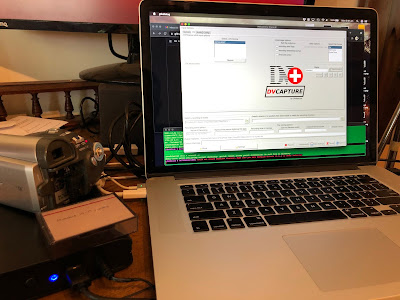
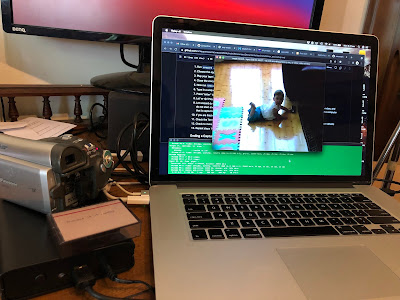
vrecord works beautifully on my Catalina (OSX 10.15) MacBook Pro - follow the Basic Usage guide and you'll be capturing those precious memories in no time.
Monday, 22 February 2021

Computers I Have Known - Part IIe

Next up in my Computers I Have Known "journey" (ugh) is the classic Apple IIe, in this case the final, "Platinum" edition with 128Kb of RAM, numeric keypad, light grey case, matching monitor and 5.25" floppy drive.
By this time, my family and I had migrated from the UK to Australia, and the Electron, although it had come with us, may as well have been made of cheese. Nobody had heard of it, nobody used it, it was a dead end. My Dad, still working off the "buy what they use at school" advice from before, went completely bananas with a full IIe "educational pack" which bundled in a Star NL-10 9-pin dot matrix printer and a ton of "educational software" (most of which was shareware, but had at least been gathered together and well-organised)

Having a printer was Very Exciting, and considerable amounts of ink were consumed with the classic Print Shop banners being the main culprit. I vividly remember the THINKING ... THINKING ... THINKING ... PRINTING screens that Print Shop displayed while you waited 15, 20 or more minutes for a big banner to tractor-feed its way into the world.


The Apple II was already a bit long-in-the-tooth when we got it around 1989 - it had an amazing run for such an "average" 8-bit machine - no doubt helped by Apple's strategy of getting it into schools. It was certainly quite depressing seeing far cheaper Commodore Amigas in department stores running demos of high-resolution bouncing balls, reflective surfaces and relatively high-fidelity music. The 16-bitters were coming and it was impossible not to be impressed by how far the goalposts had moved on. The flipside for me was the popularity of the Apple with my peers (and the ease of copying its disks) made it far easier to expand my software portfolio than I had ever experienced before.

Some more of my favourite software for the Apple: (all screenshots from Moby Games)

Choplifter

A clever example of how great playability can completely offset some pretty ordinary (tiny, horribly-coloured) graphics. You can play it on the Internet Archive here.

California Games

Radical! Tubular! You're wild and crazy! A nice collection of action sports that didn't take itself too seriously. You can play side 1, which includes my favourite, BMX, at the Internet Archive.

Wings of Fury

What an absolute masterpiece of an arcade game. Amazing playability and balance of realism and challenge. You can actually go and play a version of it online and while it's the PC version not the Apple original, I recommend you go and do so immediately. The Internet Archive also holds the true Apple II version but it asks for side 2 of the disk and I can't find a way to feed that in; although the Emularity project that makes this possible are aware of the issue.

As I progressed through high school, the capabilities of the Apple as a word processor became far more important. Many of my peers were still submitting draft essays in longhand, then rewriting the whole thing again after getting the teacher's feedback - a process that seemed incredibly repetitive and wasteful. I took the opportunity (for perhaps the first time in my life) to harness the power of the computer to save me some effort. AppleWorks had been included in our original bundle of shareware, and I used it for a good few years. Being about as non-WYSIWYG as it gets, it was my introduction to marking up text, and thus some of the fundamental ideas of HTML were getting drip-fed to me as I wrapped a sentence in Ctrl-U (or whatever it was) to underline it. The whole printing process was a lot more manual too - choosing a font and its output quality was done with buttons on the printer's front panel, and constant vigilance was required when spanning pages; top- and bottom- margins were highly variable in reality.

A revelation came along when I "obtained" (probably through some disk-copying skulduggery at school) what I think must have been BeagleWrite (although I have no recollection of that name), which was a full WYSIWYG, GUI-and-mouse driven word processor, with white background and black text making it look like a true Mac refugee. I was fairly familiar with the Mac's point-and-click paradigm but actually doing productive work with it (as opposed to just fooling about on someone else's computer) was pretty incredible. I believe we'd call it "discoverability" now, but the ability to just see what commands were available, and of course undo them was mind-blowing. I think it's fair to say that the reason I became "good with computers" was through amazing pieces of software like BeagleWrite where there was no penalty for just trying stuff to see what happens. Apparently this is not that common a trait ...
BeagleWrite screenshot from Vintage Geek - for such an incredibly-good bit of software there is very little evidence of its existence!

And I can't write a post about the Apple II without mentioning my own brush with its legendary creator Woz. Probably the most famous person I will ever have had the pleasure and honour of meeting.

Thursday, 31 December 2020

Quick 2020 A-Z Wrapup

So 2020 was a thing, huh?

In between all the incredibly bad stuff, there were a few cool techy things worth remembering:

  • Apple released their M1 Silicon which is ushering in a new level of performance and power-efficiency
  • OpenHAB Version 3.0 has rolled out and fixed a lot of quirks and clunky behaviours, improving the WAF of this automation platform still further
  • Tesla shipped its millionth electric car and became the world's most valuable carmaker
  • Zeit rebranded as Vercel and continued to build Next.js as the best framework for React apps

Stay safe!

Wednesday, 29 July 2020

TASCAM FireOne on MacOS High Sierra: finally dead

I suppose it had to happen, but today, my TASCAM FireOne Firewire audio interface just ceased to work properly - namely, the audio input has a constant clicking sound making it unusable.

I suppose I should feel fortunate that it has lasted this long; I mean, look at the MacOS compatibility chart:

- yep 10.4 and 10.5 only, yet here I am on High Sierra (10.13) and it's only just turned up its toes.

It's even less whelming on the Windows side:

... XP only (!)

So now I'm on the hunt for a good interface that will last as long as this one did. Firewire seems to have been effectively killed by Apple, and Thunderbolt interfaces are incredibly expensive, so it'll be back to good ol' USB I guess. I'm thinking that with the rise of podcasts etc, Apple will be obligated to ensure USB audio interfaces that use no additional drivers (aka "Class-Compliant devices") work really well for the foreseeable future...

Thursday, 25 June 2020

Home-Grown Mesh Networking Part 2 - When It Doesn't Work ...

A few months ago I shared some tips on using existing Wifi gear to make your own mesh network.

Turns out though, it might not be as easy as I initially made out. In particular, I was noticing the expected switchover as I walked down the corridor in the middle of my house:


... was simply not happening. I would be "stuck" on Channel 3 (red) or Channel 9 (green) based on whatever my Mac had woken up with.

Lots of Googling later, and the simplest diagnostic tool on the Mac turns out to be Wireless Diagnostics -> Info - take a snapshot, turn off that AP, and wait for the UI to update. Then stick them side by side and eyeball them:


I wasted quite some time following a wild goose because of the differing Country Codes - it's not really something you can change in most consumer AP/routers so I thought I was in trouble, until I discovered that "X1" really just means "not broadcast" so I decided to ignore it, which turns out to be fine.

Now the other thing that was most definitely not fine was the different Security policies. I thought I had these set up to match perfectly, but as you can see, MacOS thought different (pun not intended).

When is WPA2 Not WPA2?


The D-Link AP (on Channel 9, on the right in the above screenshot) was supposedly in "WPA2 Personal" mode but the Mac was diagnosing it as just WPA v1. This is most definitely enough of a difference for it to NOT seamlessly switch channels. Even more confusingly, some parts of the MacOS network stack will report this as WPA2. It's quite tricky to sort out, especially when you have access points of different vintages, from different manufacturers, who use different terminology, but what worked for me (on the problematic D-Link) was using Security Mode WPA-Personal together with WPA Mode WPA2 plus explicitly setting the Cipher Type to AES and not the default TKIP and AES:


This last change did the trick for me, and I was able to get some automatic channel-switching, but the Mac was still holding on to the Channel 3 network for much longer than I would have liked. I could even stand in the same room as the Channel 9 AP (i.e. in the bottom-left corner of the heat map above) and not switch to Channel 9.

Performance Anxiety


The clue, yet again, is in the Info window above. In particular, the Tx Rate field. It would seem that rather than just naïvely choosing an AP based on signal strength, MacOS instead (or perhaps also) checks the network performance of the candidate AP. And look at the difference between the newer dual-band Linksys on Channel 3 (145 Mbps) and the D-Link on Channel 9 (26 Mbps)!

There are plenty of ways to increase your wireless data rate, the most effective being switching to be 802.11n exclusively, as supporting -b and -g devices slows down the whole network, but (as usual) I hit a snag - my Brother 2130w wireless (-only) laser printer needs to have an 802.11g network. As it lives in the study, a couple of metres from the D-Link AP, I'd had the D-Link running "mixed mode" to support it.

Printers were sent from hell to make us miserable


As it turns out, the mixed-mode signal from the Linksys at the other end of the house is good enough for the printer (being mains-powered it's probably got very robust WiFi) and so I could move the D-Link to "n-only". But there was a trick. There's always a trick ...
You need to make sure the printer powers up onto the 802.11g network - it doesn't seem to be able to "roam" - which, again, makes sense - it's a printer. It knows to join a network called MILLHOUSE and will attempt to do so - and if the "n-only" network is there, it'll try to join it and never succeed.
So powering down the n-only AP, rebooting the printer, checking it's online (ping it), then powering the n-only AP back up again should do the trick.

Summary


Moving the D-Link AP to n-only doubled the typical Tx Rate at the front of the house to around 50 Mbps, the result being that the Mac now considers Channel 9 to be good enough to switch to as I move towards that end of the house. It still doesn't switch quite as fast as I'd like, but it gets there, and doesn't drop any connections while it switches, which is great.

Here's the summary of the setup now:


Living RoomStudy
DeviceLinksys X6200D-Link DIR-655
IP Address10.240.0.210.240.0.3
Channel39
Modeb/g/nn-only
Band2.4 GHz2.4 GHz
Bandwidth20 MHz20 MHz
SecurityWPA2 PersonalWPA Personal (sic)
WPA Moden/aWPA2 Only
Cipher Typen/aAES Only


Stand by for even more excruciating detail about my home network in future updates!